Now that I have time for hobbies again I wanna dive right in to building up a home lab. Right now I just have a Netgear router that reached end of life, and a NAS i’d like to make accessible remotely, and a DIY router seems like the correct next step for me. I’m very interested in ad-blocking network wide and someday I’d like to host my own little webpage, but for now I’m really just barely getting started.
I’m information gathering, I don’t know what I don’t know and my networking skills are pretty weak anyway. But even if your needs and desires have nothing to do with mine, I also just like to hear people talk about their set ups. Please? 🌞
Currently running OPNsense on a small Dual-Nic Shuttle PC with an Pentium G4560 and 4 gigs of ram and it’s been handling everything I throw at it perfectly fine. Ive got 16 Interfaces, around 10 Wireguard Peers and a SIT tunnel to HE and Im still getting Line Speeds through the firewall.
a minipc with 2 nics running proxmox with opnsense as a vm and one of the nics passed through. that way I can use it for more stuff.
A used Lenovo ThinkCentre Tiny M720q mini PC, with the PCIe riser and an Intel chipset (Huawei) dual-10 Gbit NIC, running a pretty basic install of OpenWrt. Has no issue with 10 Gbit throughput, maxes out at about maybe 12 Gbit if you do a full duplex test, which I think may be a limitation of the limited PCIe lanes in the riser.
I got 10 Gbit internet at home, looked at the prices of 10 Gbit routers and noted right out! Built this for maybe $100 in stuff off of auctions.
A fanless thin client with Opnsense and a four-port Intel NIC.
This is the way!
Opnsense on whatever. Plus pihole for DNS/adblock.
I put Opnsense on an Intel Pentium G3220 and it’s been rock solid for gigabit.
I bought a firewall appliance based on an Intel CPU, with 4x 2.5gbps Ethernet ports, 8gb ram. Installed opnSense on it and been super happy even since!
A bit pricey the hardware, but it’s been totally rock solid for almost two years now.
I have configured unbound with ad blocking on opnSense, and it has every single option I would ever want on it. Amazing stuff.
I’m eyeing a similar one, but with 2x sfp+ ports too.
I’ve seen a lot of people on YouTube talking about this or that cast off networking device that they turned into a router. I do find the idea of repurposing especially old tech appealing. Or did you buy it brand new?
I bought it new, but of course you can repurpose old hardware!
Not sure how “DIY” you want to go. I’ve been liking OPNSense though. Running it on an air cooled Protectli box.
Handles a symmetric 2Gbps connection just fine.
This is what I’m doing too. I’m super happy with the results and how many options are now open to me.
Originally I was thinking I’d find a used business mini pc and put some open source router OS on there, still haven’t picked which one. But I’ve gotten super into, like, being cautious about power consumption and some of the little boxes you can get on AliExpress seem like that might be a better option? I’m not sure yet. What’s a Protectli, if you don’t mind?
This is protectli: https://protectli.com/
If you’re especially looking for good power consumption, I’d look into some embedded system with OpenWRT. I was especially looking for something that could handle high bandwidth and manage some higher level features that OPNSense has.
Thank you!
Someone suggested seeing if I could install openWRT on my current router, I might start there instead of buying anything right away, I can always grow more later as I find I’m ready to start doing x, y. or z if I find I need to.
But I’d never heard of protectli. I have a feeling that, since I was just browsing youtube to start, I mostly only learned about companies that are doing youtube sponsorships lol
Someone suggested seeing if I could install openWRT on my current router, I might start there instead of buying anything right away, I can always grow more later as I find I’m ready to start doing x, y. or z if I find I need to.
I like the spirit! That’s an excellent place to start. If you find you need more later, there’s plenty of options to grow.
I run some china box with 5 integrated 2.5GBe NICs, 48GB RAM and 2x 500GB SSD/NVMe. CPU is Celeron® 6305 @ 1.80GHz, two cores or HT, who knows…
On this I run Proxmox. I didn’t like Proxmox integrated firewall, so I rolled my own.
all containers unprivileged
one container is the firewall. it has all up+down stream NICs mapped via bridges, cable internet, backup 5g internet on dedicated ports. one port to the switch with a few VLANs, and one bridge that is local to the Proxmox for the local VLANs.
Every service I operate sits in its own network/segment, usually with a /30 netmask. VMs/containers have a eth0 device in this and the firewall defined as default gw. On the firewall the VLAN interfaces are named as the container/service. So the interfaces are not eth0 but wan, wan5g, frigate etc. Great for readability.
Some networks like “family” or “guest” or the one with the APs/WLAN-controller are /24. Bit big, but what ever.
I have a structured netfilter firewall script, fw.sh calling it’s parts under fw.d/*fw. Each service is managed individually, sometimes widely open (
iptables -A FORWARD -i frigate -o wan* -j ACCEPT) but usually down to the required ports. Database, reverse proxy etc all on separate containers.There is also like 30 VPN configs from 2 VPN providers. I have a home assistant dashboard where I can direct specific devices to use specifig VPNs. My webradio is routed via UK so I can enjoy BBC2.
root@mercury:~# ip rule show
0:      from all lookup local
20:     from all lookup main suppress_prefixlength 1
300:    from XXX lookup wan_table
310:    from XXX lookup wan5g_table
1000:   from all fwmark 0x1 lookup bbc-ss-lon
1001:   from all fwmark 0x1 lookup bbc-ss-man
3000:   from XXX lookup pm-gb
4000:   from all lookup wan_table
5000:   from all lookup wan_table
5100:   from all lookup wan5g_table
32766:  from all lookup main
32767:  from all lookup default
ip rule also does the fail over to wan5g if required. There are some rules where I tried to auto-filter BBC traffic with marked connections via dnsmasq, but BBC knows all my VPNs (not BBC radio it seems).
IPSec VPNs and other OpenVPNs (dialup, site2site) are handled via a dedicated LXC. There is a tor entry node container, for a few services and one of the public WLANs. Firewall makes sure certain traffic can only exit via certain upstream interfaces, vpn*, wan, wan*… very helpful
I didn’t like opensense… don’t know why. Work a lot with firewalls in my job (mainly check point, fortigate) so have some professional background.
Also: client isolated WiFi for all iot shit. No internet for TV (jellyfin), PV controllers and most others.
HP Prodesk with some i5 8th gen running proxmox and with a 4x 1gb pcie nic on which a opnsense vm runs.
My DNS was done through pihole. Transitioned now to technitium-dns.
My personal blocklist(s):
https://github.com/Appoxo/Ad-Spam-Blocklist
Contains a list for opnsense (IPs) and technitium-dns (but pihole should be compatible).
Anything else should be mentioned in the readme.In case of questions, feel free to ask.
I usually just use proper network devices. OpenWRT will generally run on anything with Mediatec or Qualcomm based assuming it has support
Another vote for openwrt
OpenWRT all the way.
Skynet firewall
PiHole
Stable IP addresses and a private interface for family phones/laptops/pcs
Guest network for nasty Roku TV/peleton
EDIT: my favorite thing about Skynet is the new-ish ability to filter by country
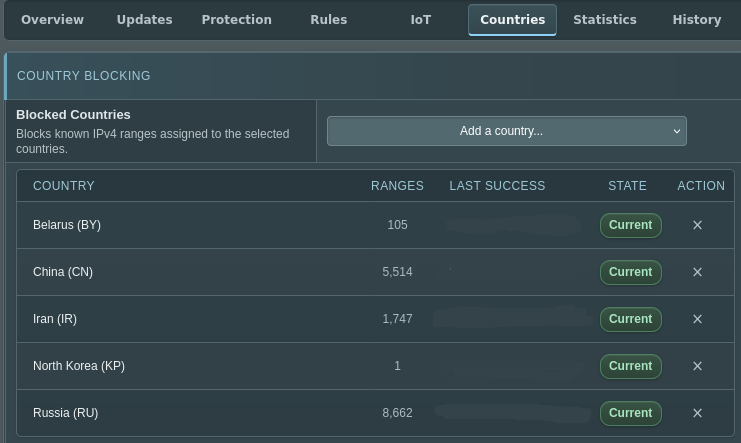
I never even thought about a guest network for different services. Why do you do that, if you don’t mind? Privacy?
You could configure different settings, such as preventing the device from connecting to ad servers. You also prevent it from scanning your network to learn about all your devices, since all it would be limited to that isolated network.
Does peloton do that!? 🥲
I don’t know. Is it internet connected? If so I wouldn’t trust it…
Many home grade routers allow you to set up a guest WiFi network though so you may be able to isolate it that way if you’re concerned/can determine what telemetry it’s sending from the privacy policy or other reports.
This article talks about their website’s standard creepy tracking cookies and stuff, which depressingly everyone does. https://blog.avast.com/what-peloton-knows-about-you-avast
But if it has Bluetooth and WiFi it has a lot of potential for tracking all sorts of things. I don’t have one and don’t know if they’re using that potential, but it’s there. It would be interesting to investigate.
I only got into privacy stuff like a year ago, but I was really focused on thinking about my phone and not as much my home network (unless we’re talking like, cloud services that are also accessed on desktop, I was already worried about those). That’s a spooky but totally valid thought imo. Agree, would be a good new rabbit hole to explore.
It’s a big rabbit hole for sure, with how many household devices are internet connected and the concerning capabilities they offer. And an expensive one if you seek to replace devices at home.
Guest Network in OpenWRT prevents inter-device communication on the LAN. So the thing can talk to its cloud service or whatever but can’t see my phone/laptop/PCs.
This means that untrusted devices which get pw0ned (or are surveillance-by-design) can’t then get into your more important machines. Most people use guest networks for IoT devices like Ring cams and smart washing machines but I don’t even own shit like that.
Lol I also passed up on ring cameras, i’d like to have a camera someday but I don’t want to go through Amazon.
I wonder if I should set up a guest network for my mother-in-law. 🤔 My husband is very on-board with my privacy-focused desires and cautious about what we invite into the home but my MIL, well, is old.
I was using an N100 based mini PC and it did fine at 1gbit. But now that I have 3, and it’s realistically closer to 4 or 5 it doesn’t cut the mustard.
Proper hardware based routers are also just so much more efficient. That N100 machine was constantly hot to the touch. My new UniFi router uses less power and does 10 gig easily.
I have 2.5G N100 and it works wonderfully at that rate. I think higher might be tough, but it still pushes that throughput even with IPS enabled in OPNsense.
The complained about heat is right though. I stuck a noctua fan on the top and it’s been happy since. It lives my closet, so noise isn’t a facto anyways
Can I ask what the 10 gig is for?
Gotta go fast. My WiFi can achieve > 1gbit, my internal network is already 10 gig. Why not support faster everywhere?
Sometimes it’s really that simple 🥰
When I retire my desktop PC, the old parts become my router. If you have two network ports, it can do it.
To warrant the power bill, it’s also a NAS, NVR, mail server, print server and web server.
All my Wifi APs are various home routers flashed with OpenWRT.
Running an email server sounds super super difficult
Not difficult with amazing software like mailcow
I’ve been running mine for over 20 years. It’s certainly got more difficult, especially to be able to reliably communicate with Gmail-hosted servers and outlook.com addresses, but SPF, DMARC, and DKIM are all pretty straightforward to set up. Tightening the encryption/hash algorithms you accept and “anonymizing” your server greetings takes some finesse as well, but I definitely prefer it this way.
I avoid the entire webmail and spam filtering aspects, smtp(s) and imap(s) only.
Oh, you can tear it down as soon as you get the certification.
Mine still runs decades later though.
I’m running pfsense with wireguard site to site connection between 2 locations. Vlan for my mqtt for my meshtastic. I did have an ad blocker on it but I found it wasn’t very good. It was blocking too many things.
Switched to Adguard on my Proxmox instead.