

deleted by creator
What do you see that makes a difference? Lack of ads or is performance also better?
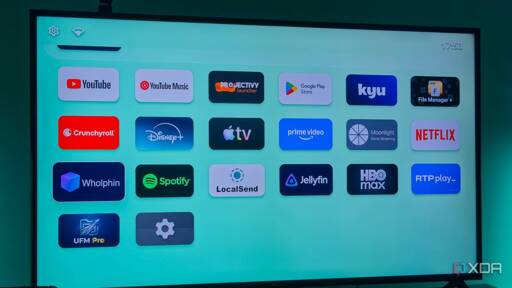
No ads, better performance, customizable
I also tried Projectivy in the past but I don’t remember why I switched away from it. I think there was a performance bug that was causing it to crash. Both may be good options now
I recently swapped back to FLauncher after using Projectivy for a while. Projectivy uses a lot more resources (cache + RAM) and my TV only has like 4GB of storage.
deleted by creator
Blocking ads usually helps performance, most ad networks are trash
Would I be able to watch Plex with this? (Haven’t made the switch to jellyfin yet)
Yes - it replaces the launcher (your home page, I guess you could say), but you can still download apps from the Google App Store and use them (such as Plex).
I have used FLauncher and now use Projectivity, and it is a great way to get rid of all the ads and bloat while keeping the TV fully functional.
just a warning about jelly is that you have to setup your own home host site. plex already comes with one it youre hoping to listen to your music on the go.
deleted by creator
I can also recommend Wolf Launcher. Been using it for years.
i use Flauncher on my Nvidia Shield Pro and have for years
Same. It’s fantastic.
deleted by creator
what to buy ? something that’s about the sane aize as a firesrick ? want to use a plug in USB thumb drive for media storage for travel and a “player” eg kodi. Dial home to Plex/JF not needed but internet access is
deleted by creator
And a key mapper to go back to the launcher instead of the home screen from a remote
deleted by creator
Is there something similar for Linux people like? I have an old computer hooked up for freetube but would like it to be the default input for my Frame TV.
deleted by creator
Projectivity is another great option, especially if you want a few more options without anything you don’t want.
I also use Projectivity on my NVIDIA shield. No ads, no recommendations, just the apps I want. Everyday I’m glad I installed it.
So you launch shield then launch projectivity? Or did you reinstall the shield os
I use Projectivy on my Sony Bravia Google TV. You can set it to auto start as the default launcher so you never see the cluttered mess that is the Google TV launcher.
Lol, just when I said I was going to take a break from tinkering, you tell us about this. Oh well! 😆
Thanks for sharing this!
++Projectivy, it’s top tier software. It’s so clean by default, has lots of customization options, and no ads whatsoever. It’s so good that I worry Google will try to take away the option to use a third party homescreen on Android TV.
Can’t we just have small Linux boxes with Plasma Bigscreen or something with cec support setup so the tv remote still works already :sob:
I’ve been using Pi 4s with a lineage OS build that has the Jellyfin Android TV client on it and thats been a pretty sweet setup.
Links?
MSI cubi fanless with KDE Neon autologin to Plasma Bigscreen with Vacuumtube, steam big screen mode, jellyfin… Remote controller is a Rii F8 mini which has a few programmable IR buttons for the old dumb TV.
The future is now…
I just bought a Dell Optiplex 990 for 50 bucks on eBay. I lucked out in that the listing came with 8 GB of RAM. Just threw in a previous SSD, loaded Fedora Kinoite, and am currently playing with Podman/Docker Compose for an Arr stack. By next week, I should be able to move it from the corner where the router is, and then finally deliver on the promise that I made my girlfriend back in February, when I bought the HDMI projector and a speaker set.*
That said, I’m all for your idea, especially if it comes with an IR receiver, too.
If I get another Optiplex (that one for homelabbing), I’ll look into COSA and Butane/Ignition files more seriously. That’s a very solvable issue, after all.
* We had to move since then and I cannot find the front right speaker, for some reason. The company, whose name looks like the antagonist of FF8, doesn’t seem to sell replacement speakers, either.
Raspberry Pis have CEC support. I’ve used it with OSMC (formerly either LibreElec or RaspBMC, one of those? It’s Debian Kodi). It was much better without. So, if you turned the TV off with the TV’s power button, the Pi would turn the TV back on.
The Pi has a 3.5mm audio jack. I have a set of desktop PC speakers that are hell and gone better than anything built into a television in the last 20 years. Not only is it not straightforward to get it to control the Pi’s audio output level with the TV’s remote via CEC, OSMC absolutely did not want to do this. Not only would that setting get revered to HDMI audio out, it would disable the analog out option, and you’d have to SSH in and change a config file to re-enable that option in the first place. That would happen either during updates or even just power cycles. I swear the phraseology of the line you’d have to put in that config file would change; the same line I’d put in there would still be in there and not working.
The thing with open source software is, it’s always going to have the UX of a sinus infection, especially since the manufacturers of hardware gimp their devices to not work well outside of the walled garden.
I decided that a game controller and antimicrox were acceptable as a supplement for the remote, and installed a full desktop OS (Gentoo/TDE, like my main system, on a Dell Optiplex box I bought off ebay last year). Works fine for my unconventional needs, although I admit I do updates, etc. over ssh because it’s faster than entering one character at a time on the on-screen keyboard.
I recently tried this with LibreElec on a NUC I already had running pihole. It would randomly freeze, I think due to some integrated Intel video shenanigans.
Next I tried KDE Neon with Plasma BigScreen. For some reason, PlexHTPC ran like absolute garbage on my 4k TV but fine on my 1440p monitor.
I got PlexHTPC running fine on MXLinux but then I couldn’t get pihole working with DoH for some reason.
Finally just put Mint on it, got them both running and figured I’d tinker more later. I just needed something that would let me stop using the TCL Roku interface.
CEC does not work, but I got a cheap remote air mouse/keyboard thing that worked out of the box.
You can!
You’ll just be limited in your app selection and then there’s DRM.
Browser shortcut/PWA, and also DRM isnt a problem because google offers linux its DRM services for free.
I did also not rule out expandable local storage for offline media. Or connecting to a jellyfin instance.
OK gang my point is not that this is impossible to DIY. In fact we really enjoy you all sharing your setups and appreciate everyone taking the time :3
We just like for something like this as a cheap (enough) commercial product to finally catch on. At the end of the day folk just want to have a TV, plug something into it, and have it work.
We were already tired of the overpriced TV boxes that shady broadband companies forced into everyones livingroom. Nowadays that horrible experience comes physically fused to every TV further out in the markey than a sane person could reasonably be expected to look.
It just super sucks to see so many pay for devices that actively fight you in general. Most electronics already inherently feel like an accesability issue simulator to most people anyways. It being deliberately opaque, confusing and facilitating dark patterns on top of that is such a PITA. Not to mention if you already have inherent accesability difficulties from any number of conditions.
well, the bigscreen matrix chat does see activity, so, one can hope
Where are the dividends in that? Buy our new stick.
I’d love a stick that has Hoopla support, but of course that’s going to be hard to come by because Big Entertainment doesn’t make billions of dollars off of it.
Roku, Android TV (ONN), Apple TV, etc. all have Hoopla support. The app doesn’t even have a way to browse titles, but if you know what you want to watch their app works.
deleted by creator
I want this, but for the roku box I got as a gift.
Fortunately Roku is still not that bad. 3 rows of items to choose from, select and go.
It basically is a dump app launcher if you go into settings and make it one. Even more so once you use a network adblock to stop the single ad they display on the right.
They overload after a while I find and then often I press the arrow, nothing happens, I press again, it moves twice. Like all smart TVs. Apps take longer and longer to open, etc.
Mine don’t do that, they are pretty snappy. But then again, mine are not TV’s.
I want to make my TCL Roku Smart TV dumb.
If any apps, preferably open source, could do a search of services to see if one has “American Beauty” (or whatever) streaming for free AND launches the app directly I’d have no need for my stock launcher.
Somebody once tried to sell a box that would cancel all your streaming services and only fire the account back up for a month at a time when you wanted to stream something. It was a phenomenal idea with a genuine problem worth solving, completely torpedoed by the fact of the box costing $400 up front and I think requiring its own subscription.
deleted by creator
deleted by creator
How? The article just says that you have to sideload it. How can sideloading an app brick your device?
.
Great, now do iOS, Roku, and whatever Amazon is pushing these days. Oh, and raspberry pi and NVIDIA shield.
Dude just switched the launcher, should be doable on most Android TV devices.
Raspberry Pi can run Android TV, so you probably could run this launcher. Nvidia Shield is already compatible.
The others are closed systems I assume, I have no experience with Apple or Amazon devices.
Well thanks for nothing.
Man, this article is full of ads infections.
Streaming sticks shouldn’t have apps. The Chromecast Ultra is the last good streaming stick. Just cast, and it plays. End of story.
Its nice to be able to use it with a remote instead of fumbling around with your phone.
Also performance, decoding support, not burning your phone’s battery, etc
Chromecast doesnt use your phone for decoding. It just tells the stick to play the video, and it plays it directly. It shouldn’t drain your phone at all.
The remote is a personal preference, but I was happy for the phone to be the remote. Having a second remote didnt gain me anything.
To be fair, I haven’t used Chromecast in a long time. Maybe even 10 years ago now.
I remember having connectivity issues, where I’d go to pause the content and realize it disconnected again. So maybe the battery drain was because of poor connections, or poorly designed apps
There were definitely some shitty Chromecast apps. ABC in Aus had a terrible one. There are also some pretty shitty TV apps as well :/
Ultra was good for connectivity, as it has an Ethernet port. Relying on wifi on a streaming stick behind a TV was tough. My TV behaves as a signal blocking wall, anything WiFi behind it is a dead zone.
I also haven’t tried the new Chromecast with google TV in a few years, but it was so terrible I returned it immediately and started scouring eBay for another Ultra. I am very sad Google killed the plain Chromecast line.
deleted by creator
The casting in the ABC app was pretty broken for a while, but I believe they redid it a few years ago.
I loved the “idea” of the Chromecast and used them exclusively for over 5 years. However the implementation was always the issue. Phones would always disconnect leading to the inability to control it, and after recent updates, kill the stream mod session.
A hybrid approach is the best IMO. A remote for ease of access and quick things, plus casting for when you alreay have your phone out and want to use the better interface.
I’ve not experienced the stream ending, but there disconnect is definitely an issue. Might be app specific?
When I tested Chromecast with google TV (5 years ago to be fair, it might be fixed now), if I casted from my phone, I then had to use the remote to choose my Netflix account and choose the show again from scratch. So it was two steps on two devices, for no good reason. It also didn’t connect to WiFi properly and didnt have Ethernet, so that killed its functionality as well.
Congratulations, you just made a copy of Apple TVOS, on much worse hardware.
Love them or hate them, the Apple TV is the best streaming box around. I’ve got One and a shield tv, and the Apple TVs level of polish and performance is on a whole other level.
Yeah, let’s get more close ecosystem shit. Stop buying things you can modify because you own them. Think of the executives, what’s wrong with you people?
What?
I’m just saying that Apple TVs are already a simple app launcher interface with basically nothing else.
You’re not wrong in it being a fantastic app launcher, but it being locked down makes it useless for many, sadly.
Being able to sideload is crucial for me at least, and the day google locks that down on Android devices is the day I will build a mini-PC for the living room.
I can assure you there’s a whole lot of telemetry and tracking in those. It’s not “and nothing else.”
Apple is the least awful about data privacy. Owning your hardware and stack is still better for privacy.
*edit: others have bored this is still using Google hardware with only a custom launcher, not a unique firmware or os environment for data sovereignty. That Sudha, and the lettuce still remains that we need more open hardware vendors, or legislation that let’s us unlock our own purchased devices to modify further. *
Yes but isn’t this article just about installing a custom launcher on a Google device? Presumably this does not solve data harvesting by Google, which would make this solution, while effective for app launching, probably worse than using an Apple TV device.
But the article is about using a GOOGLE TV stick……
It’s not about “owning your stack”.
Right, this isn’t accommodating that, but I still contend that needs to be the goal.
I dint own this device or an AppleTV, while I’ve owned both in the past.
Can I use an apple TV without an account? Arr there good YouTube apps with adblock, and how is the kodi and jellyfin support. If good I will switch
Jellyfin works well enough with swiftfin, but does have some annoyances e.g. subtitle and audio track support is tied to the player configured (native vs other).
It’s the more reliable client app I’ve experienced as long as you stick to 1080p though. 4k is a hit or miss, but that could be my network or server (although I do direct play when possible, but it still has the occasional issues).
I also prefer using an AppleTV as my TV media player, but as long as the UI is snappy and it it’s capable of decoding HEVC, AV1, and other modern codecs smoothly, this solution is perfectly cromulent.
I haven’t used other streaming boxes lately, but I find this hard to believe, mainly because of the shitty AppleTV remote with the godawful touchpad that everybody decided to implement different gestures for and which is notoriously difficult to gesture properly with and only when intended to
otherwise, I do agree that the AppleTV itself is quite polished. I use it for any streaming services that I may have, which is not many lately but was quite a few in the past, Plex, and YouTube primarily. also used to do some Zwift on it before I changed to using an iPad.
besides the absolutely horrible remote that for some reason doesn’t have actual buttons for arrows and confirm, the rest of the experience actually is quite good and generally anything that is not is to do with the apps themselves. for example, Sportsnet is just a fucking terrible app no matter what platform you’re on.
The current remote has physical buttons that have a track pad over the surface of them. You can completely disable the track pad and gestures and just use it like a plain old remote if you want. The gestures-only remote was replaced years ago, thankfully.
https://www.apple.com/shop/product/mw5g3am/a/siri-remote

This is the old one that I assume you’re talking about?

The remote is shit, yes, and there’s an alternative to it. I can’t recall whether or not they’ve fixed that on the newer AppleTv remotes or not, but I detest that there’s no mute, either.
That said, it’s still pretty good, especially compared to the alternatives. The Roku keeps enshittifying harder and harder
You must also be thinking of the older one which was crap. This is the current one which has clicky physical buttons that also can act as a gesture pad, and a mute button.
https://www.apple.com/shop/product/mw5g3am/a/siri-remote

This was the garbage one before that:

It’s ironic how the only place to reliably navigate back on an Apple device is through the Apple TV remote.
I have a shield tv from forever ago. It’s still plenty fast enough. All the apps we use come right up. I use a third party launcher so I can declutter the screen a bit and it’s just fine. These things done have to be blazing fast.
The shield tv is still by far the best Android box in the market. It’s insane how it’s still supported by Nvidia, and still better than anything else out there.
The Apple TV is “decluttered” by default.