

You must log in or # to comment.
With the “wonderful” tooling at work, we use Skype for Business. Naturally, that is not the primary place to send around code and configs, but a 1-liner or 2-liner happens.
You can’t believe the nonsense it does when you try to copy & paste it. Spaces get turned into non-breaking spaces etc. Looks completely normal when pasted directly into vim on a console, but will give “odd” error messages.
Skype still exists?
At this point, even Microsoft wants them to stop using it, but they are stubborn and try to keep it running until they turn off the lights the hard way.
IDE users pretending compilers don’t exist.
$ guix shell gcc

[env]$ g++ test.cpp
test.cpp:4:16: warning: `0;' is not in NFC [-Wnormalized=]
    4 |         return 0<U+037E>
      |                ^~~~~~~~~
test.cpp: In function ‘int main()’:
test.cpp:4:16: error: unable to find numeric literal operator ‘operator"";’
test.cpp:4:18: error: expected ‘;’ before ‘}’ token
    4 |         return 0;
      |                  ^
      |                  ;
    5 | }
      | ~
Look ma, no IDE! 😸
Okay fuck you op
Pretty much any ide will spot that. Maybe you can use it to teach your colleagues not to use a plain text editor.
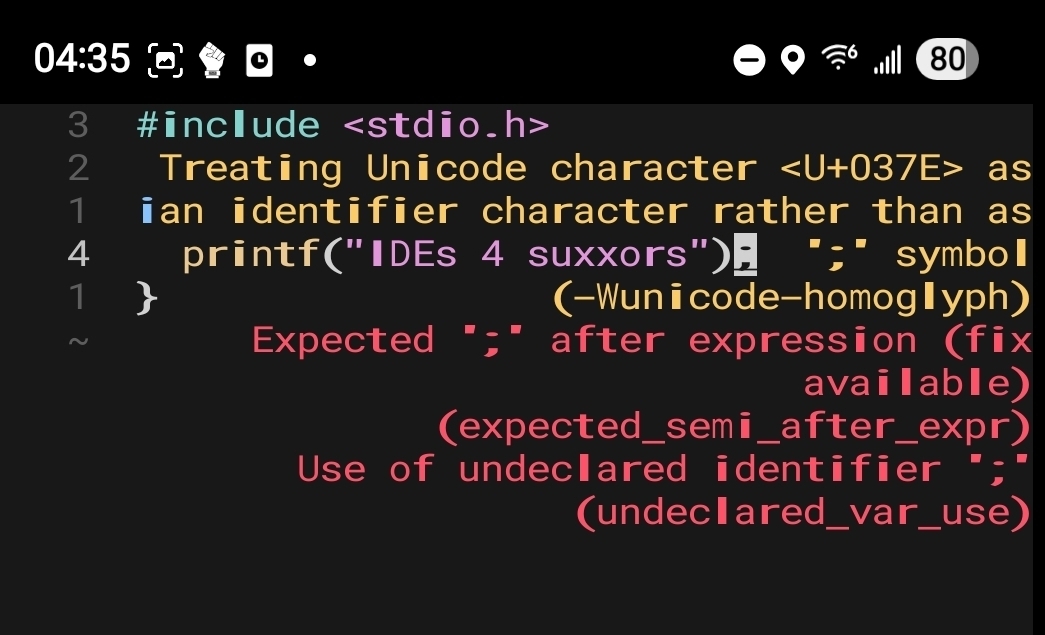
That’s the plain text editor Helix. In a terminal. Over ssh. On my phone. Which I can do because I’m not using a dumb IDE.
Developing on a phone sounds like one of the most unpleasant experiences I can imagine. And I include dinner with my ex.
It absolutely would be. It is, on the other hand, occasionly useful to be able to pop in and change a config file, many of which are actually Turing complete languages. What I do far more often, though, is SSH into remote, headless servers and write code there, which is exactly the same as doing it from a phone, only much more comfortable.
You can pry my vim and nano from my cold, dead hands!
^(I use an ide sometimes)^
I’m gonna need the vi guy to teach me how to get this functionality in nvim pls–don’t make me leave
I mean sure, but it’ll still likely leave 'em scratching their heads for a while before they go “I guess I just… replace the semicolon…?”
fr*cking rust ruining the fun


You can’t err out rust.
Wow!
This seems to be further evidence that the process for assigning UTF entities has been thoroughly corrupted.
You can (apparently) copy/paste this on mobile:
“;” (Greek question mark)
“;” (Semicolon)
You can even render it in HTML:
    ;
    ;
And it’s included on Wikipedia, because of course it is:
Because I’m not sure what my mobile client will actually do with this comment, here’s the link to the HTML entity I used:
Also there’s plenty of other character joy to be had:
If I don’t understand what’s happening here but want to, should I research Unicode in general or something else?
Unicode is a way to encode the things that humans use to write stuff into a computer.
ASCII is for example another way, as is EBCDIC.
All these methods translate squiggles that we’ve used for centuries into something that can be represented inside a computer.
For example, the letter “A” is under ASCII represented by the number 65.
This post is pointing out that there are two characters that look identical, but have different numbers, which means that what the user sees is identical, but what the computer sees is different.
This is the basis for much tomfoolery.
deleted by creator
I don’t see a problem
#include <iostream> #define ; ;; int main(){ std::cout << ";\n"; }Whoa the font on the Lemmy web UI actually renders them differently!