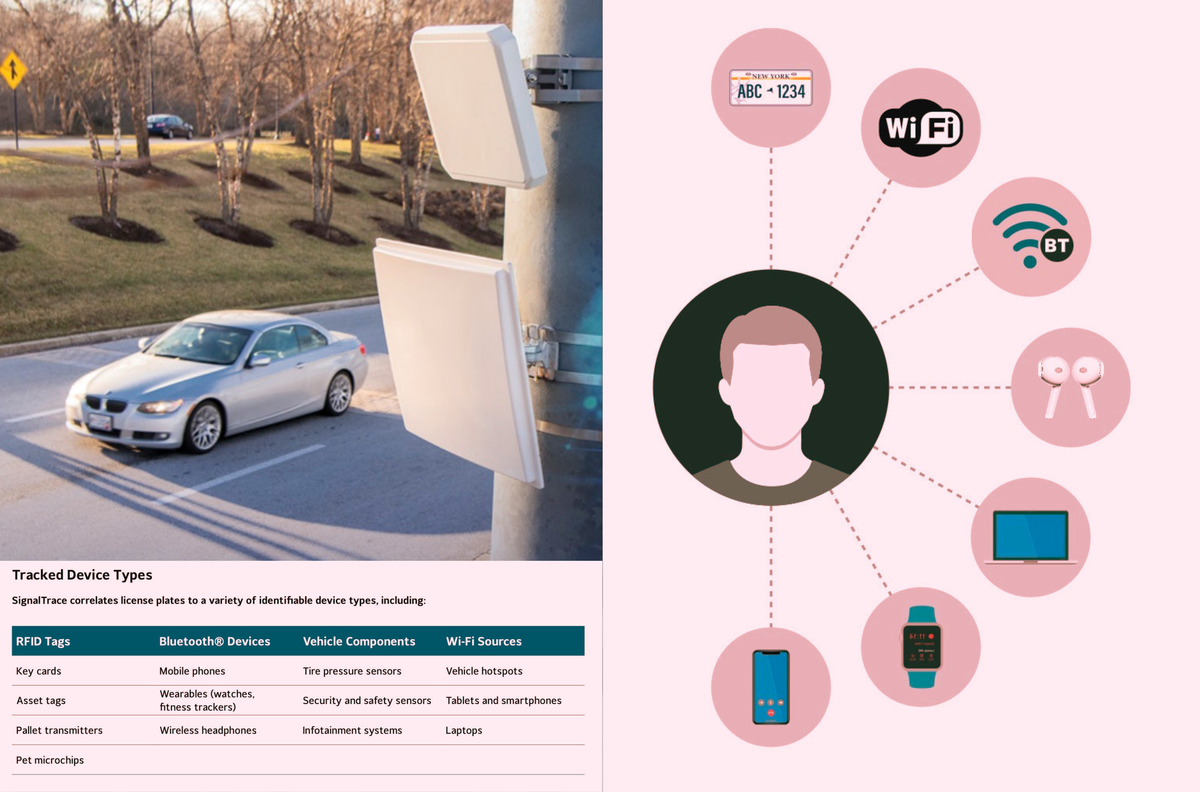
SignalTrace “links devices that regularly travel together, correlating them to license plate.” It is a surveillance product that will sweep up and add all sorts of Bluetooth and other data to license plate readers, linking specific devices—and people—to cars.


+1 Phone on airplane mode (eliminates WiFi/BT cellular & GPS tracking)
run physical mobile hotspot device for data (like Calyx hotspot - +2pts of you pick Moxee model to also run rayhunter)
connect to hotspot over WiFi with random MAC addresses (effectively eliminates IMSI tracking)
Enable a solid VPN. (Helps hide location and other usage)
Use chat/text/phone apps over WiFi (eliminates carrier tracking)
+5 for degoogled OS with profiles capability
+3 for Firefox forks like Librewolf or Waterfox with Port Authority and Privacy Badger
EDIT: btw the tech from the article is called SingleTrace…
Pretty sure I can’t use VoWiFi without at least a sim card. How are you going to do that without carrier tracking?
Or are you implying I should be a recluse who can’t be reached via phone?
I’ve gone the route of setting up my own XMPP server, using jmp.chat to get a new mobile number, and using Cheogram as my client. Works really well for my alt OS phone. You can use Cheogram, Conversations, Snikket, Jabber, etc. You won’t be able to use VoLTE or RCS, but I’ve invited friends to my server instance and just tell them it’s a new chat app better than Signal so it has OMEMO e2ee, but you can also text regular phones numbers, too.
Doesn’t this ultimately just make an IMSI available anyway? Or am I missing something here?
It would only expose the IMSI of the hotspot I believe, since that’s a SIM card ID, I believe the IMEI would possibly be exposed, but you could also use a VPN to help. It’s been a while, but check this out: https://inv.nadeko.net/RyirQOCUUK8?__goaway_challenge=js-refresh&__goaway_id=47dd286e4b20d07c3f900fbb588ada2e&__goaway_referer=https%3A%2F%2Finv.nadeko.net%2F&t=3
Does it also disable BT low energy?
BLE would fall under BT, so I would think so. Airplane mode would disable all radios.
https://news.ycombinator.com/item?id=39977355
Does it work on it too?
I guess the real issue after thinking on it, there’s no way to disable the wearable’s BLE/BT as those are always on. You might have to power it off to truly disable… According to a few different sites, disabling BT would also disable BLE as is the same chipset, but again that’s only your phone.
Even though I use GadgetBridge for my wearable, I think I’m ready to get rid of it all together. I don’t need to count my steps after all nor heart rate, etc 😅
My old phone is still Android 12, if I enable Airplane mode, WiFi, cell, BT turn off immediately. Idk About newer OSes like that says. You could maybe it’s a different phone with BLE to test scanning for other devices?? Idk, I gotta look into this one now! TY for sharing.
A little overkill for most people.
There’s no IMSI tracking through WiFi afaik, only cell service.
Airplane mode, VPN, and messaging apps is pretty good. I believe randomized MAC is the default on Android so no need to modify there. (Though it’s nice to disable that on your home network so you can track yourself.)
Could be overkill, but if you’re out and about your cell data is likely on. Then what? Now, my phone, my laptop, or other devices can utilize it. Unlimited data.
How’s that different from just running the hotspot on your phone?
Your phone as a hotspot still uses the data plan, so all the data you don’t want going out still goes out. Using a hotspot eliminates a lot of the background data (set as metered network or use NetGuard, etc)
Check out for more details, it’s been a while. It’s taken me months to test this all out as I took my time, but works well
https://inv.nadeko.net/RyirQOCUUK8?__goaway_challenge=js-refresh&__goaway_id=47dd286e4b20d07c3f900fbb588ada2e&__goaway_referer=https%3A%2F%2Finv.nadeko.net%2F&t=3