Mine is 186GiB. I have about 100 movies and 3 TV series on a two hard disks (one for backup). I don’t know if that is small or large.
How big is your collection?
You must log in or # to comment.
Nice try FBI 😎
You can say size, just say it’s all old public domain stuff like mine is.
Came here to say the same thing.
128TiB, which is about 3k movies with I think 20+ shows. Some of the files are over 100GiB though.
Thats about a few days worth of downloads for me. Over 150tb raw 80 tb used
Damn…got a rack server full of drives?
Nowadays thats less than 10 drives. I literally just ordered 10 20 tb drives to fill my second nas.
I have two synolygy 1019+ with ds 517 expansion units. That 10 drives for each set. Technically i could set that up to have about 400 tb usable.
I buy factory recertified drives for about 200 ea. with a couple spares.yea its a chunk of change but not too crazy.
I have multiple friends with more than a pb.
have you ran into any issues with the reconditioned drives? the thought has never set easy with me
Been running factory refurbished. Thats the important part. It must say factory refurbs. Ive had one failure in 5-6 years and was warranty replaced
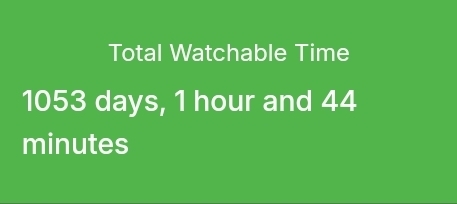
4451 movies 398 series / 36130 episodes Taking up 25.48tb after conversion to HEVC compressing it ~40%
Every series is monitored for new episodes which download automatically; and there’s a dozen or so public IMDB lists being monitored for new movies from studios/categories I like. Anything added to the lists gets downloaded automatically.
Then there’s Ombi gathering media requests from my friends/family to be passed to sonarr/radarr and downloaded.
At this point, the library continuously grows on its own, and I have to do little more than just tell it what I want to watch.
What’s your process for recoding? I’m nearing 120tb used space and would like to re-encode some of the stuff my *arr stack grabbed before I got my profiles tuned in.
I used to use the built in convert options in Emby server, but recently switched to Tdarr to manage all my conversions. It’s got far more control/configurablity to encode your files exactly how you’d like.
It can also ‘health check’ files by transcoding them, but not saving the output; checking for errors during that process to ensure the file can actually be played through successfully. With 41k+ files to manage, that made it much easier to find and replace the dozen or so broken files I had, before I found them by trying to play them.
Fore warning; this is a long and intensive process. Converting my entire library to HEVC using an RTX 2080 took me over 2 months non-stop. (not including health checks)
Awesome. Thanks for the info. I have been running Plex for years and started the switch to Jellyfin last year. Have a container running Emby but haven’t put any work in to configuring or much yet.
Same situation with Tdarr. Threw together a quick container and got caught up in a billion other projects. I have an old 3600x / 1080ti system I’ll likely use as a transcoding node. Just need to go over the docs and figure out how to setup input / output paths.
Why not let *arrr find good HEVC releases by searching again? Just set remux to be considered as lower quality as the other releases, and *arr will upgrade the files by replacing remux with non-remux files. Did that, got many TiB back 😁
What’s your electricity bill like? That’s 0.12 pb. Monstrous in my opinion.
The majority of my stack as well as vehicles run off renewables / solar. So it’s hard to tell. May seem like some massive library but it has been accumulated over 25 or so years and is composed of a shit ton of physical rips from a pretty extensive library of everything from VHS and vinyl to uhd…
Pretty cool that you’re able to use renewable energy. Do you know how much power it consumes? And do you have a backup power supply? Uninterrupted Power Supply I think it’s called.
Overall it’s (currently) a couple jbods plugged in to a NUC. Total draw is at 81W currently. That’s based off of a quick remote check on my UPS.
That’s a Ubiquiti Dream Machine Pro, Modem, Ubiquiti U7 Pro, 2 - 6 disc jbods running Seagate exos 20tb, and the NUC.
There’s a secondary drive array but it only powers on once a week for a few hours to run backups/differentials. Even under that load I don’t really spike above 100W.
Compared to the draw my old full rack with a couple loaded up r210’s has, this is incredibly efficient.
you’re just using jbod? with that many disks, aren’t you worried about them failing? or do you just redownload it if that happens
That is incredibly efficient! Thanks for the info 🙂 I’ve wanted to be hoarder, but never thought I could afford it in the long run.
It must be pretty loud though, no? One would need a dedicated room for it, I image.
.
Currently 40.2 TB, around 1800 movies, 430 TV shows and 4600 albums.
As big as whatever I’m consuming hasn’t been consumed yet or reached 3.0 ratio.
Tree fiddy.
7 inches
3TB most of it from Kemono or anime piracy.
1,200 movies
200 shows
Smattering of books and a few GBs of music
Oh and every game for every console older than the PS2Originally across multiple 4tb external drives but been mostly pushed to one nas 8tb drive in my case.
About 12 tb. 3 12 tb hdds, raid 5. Run arr suite, qbittorrent, jellyfin, and some non piracy related things. I should get a proper backup, but money.
Just over a terabyte spread over two drives not including whatever I put in my backup.
I don’t keep any TV series after I watch them, unless someone else with access to my Jellyfin wants to watch too. So my collection is relatively small at a few terabytes.
55TB
3,500 movies, 28,000 TV show episodes, 120,000 audio tracks, and pretty much every single PlayStation/Sega/Nintendo game ever released.
I don’t have one lol