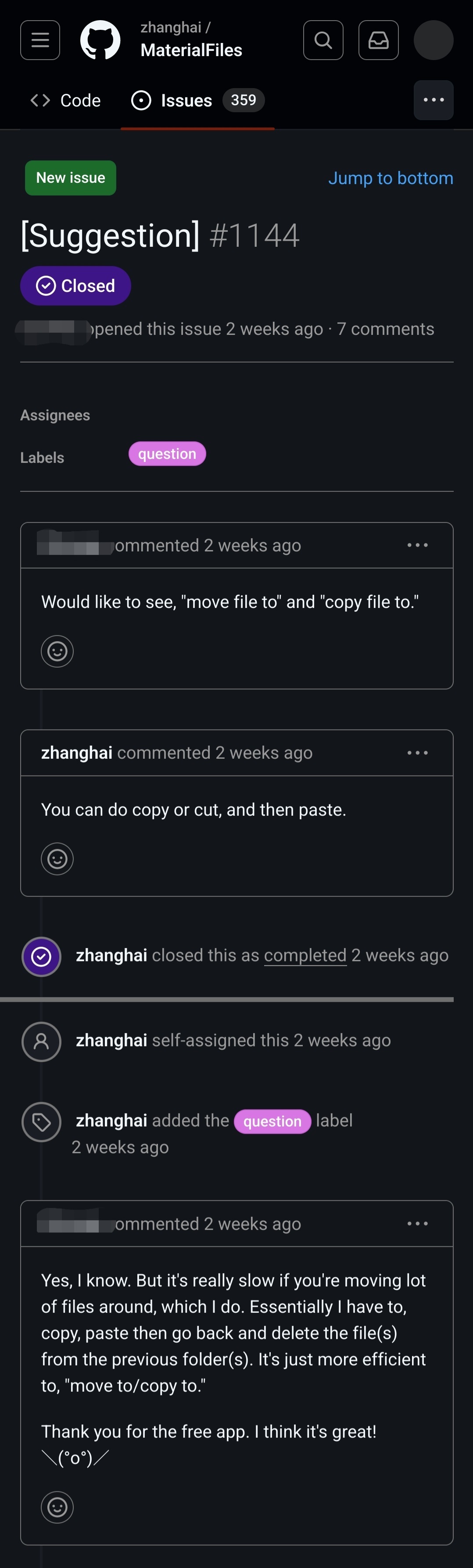
It would seem that the end user has no idea what “cut” means. I never have to “go back to the original directory to delete the originals”. That is what “cut” is for.
Besides, as other comments pointed out, one can make a multiple selection, and then, in conjunction with “cut”, it will work exactly like the feature described at the end. 🤷♂️
I think what the user is trying to say: I’m moving a large number of files to different locations. So selecting a large number of files and copy pasting isn’t really helpful. I can imagine navigating to a folder, selecting the right file, copy, navigate to the other folder, paste etc. to be very inefficient. I can imagine in such a case a copy to / move to feature is useful and I have seen that feature in a lot of other places.
Of course the user would be helped somewhat if he understood what cut meant and the other commenter isn’t really helpful in this aspect. Just saying: “There is cut” doesn’t help if the user doesn’t understand what cut means.
Also calling a user out like this is really uncool, the user obviously doesn’t have English as a first language and/or has trouble expressing their selves. This doesn’t invalidate them or their request.
I have thought about that too, but I’m pretty sure the user has difficulties even before that, like they are copying one by one and then deleting from the old place.
But considering the shrug face at the end, and I also think there’s something wrong with this bug report, I have a feeling that this is not even a honest issue.
This is barely related, but I’ve recently discovered it using Firefox and just wanted to share my misery. If you’re not using Chrome with the Google Docs extension, then Google Sheets will REFUSE to let you copy and paste with a right click context menu. But you can just press the keyboard keys to do so, or use the menu options to do so.
Like…what? It works, but they refuse to let you do it with the context menu, despite including them in the context menu.
If you try, it pops up a window and tells you that you have to install their extension or pound sand.



It would seem that the end user has no idea what “cut” means. I never have to “go back to the original directory to delete the originals”. That is what “cut” is for.
Besides, as other comments pointed out, one can make a multiple selection, and then, in conjunction with “cut”, it will work exactly like the feature described at the end. 🤷♂️
I think what the user is trying to say: I’m moving a large number of files to different locations. So selecting a large number of files and copy pasting isn’t really helpful. I can imagine navigating to a folder, selecting the right file, copy, navigate to the other folder, paste etc. to be very inefficient. I can imagine in such a case a copy to / move to feature is useful and I have seen that feature in a lot of other places.
Of course the user would be helped somewhat if he understood what cut meant and the other commenter isn’t really helpful in this aspect. Just saying: “There is cut” doesn’t help if the user doesn’t understand what cut means.
Also calling a user out like this is really uncool, the user obviously doesn’t have English as a first language and/or has trouble expressing their selves. This doesn’t invalidate them or their request.
Totally agree.
Ok, folks, one of us needs to do a PR on this app to implement this fella’s feature request!
I’ll add it my list of things I want to do but never get round too.
I have thought about that too, but I’m pretty sure the user has difficulties even before that, like they are copying one by one and then deleting from the old place.
But considering the shrug face at the end, and I also think there’s something wrong with this bug report, I have a feeling that this is not even a honest issue.
I use material files and when you press the cut icon, it literally says “move to” while you are selecting the destination
This is barely related, but I’ve recently discovered it using Firefox and just wanted to share my misery. If you’re not using Chrome with the Google Docs extension, then Google Sheets will REFUSE to let you copy and paste with a right click context menu. But you can just press the keyboard keys to do so, or use the menu options to do so.
Like…what? It works, but they refuse to let you do it with the context menu, despite including them in the context menu.
If you try, it pops up a window and tells you that you have to install their extension or pound sand.
Yeah, well, I would advise you against using google docs, but at least you are using Firefox 😅